
The Purdue model has been the gold standard for OT network architecture since the 1990s. Yet when it comes to monitoring these carefully architected networks, most organisations deploy SolarWinds as if they're monitoring a standard IT environment. They add devices, configure alerts, and assume they're done, without considering how their monitoring architecture aligns with Purdue's security principles.
The result is monitoring that either compromises security (by requiring bidirectional access across security zones) or fails entirely during isolation events (when OT networks need to operate independently from corporate IT).
This article walks through how to properly align SolarWinds deployment with the Purdue model, ensuring your monitoring architecture supports, rather than undermines, your OT security posture. As a bonus, this approach also satisfies SOCI compliance requirements for Australian critical infrastructure operators.
Why standard SolarWinds deployments don't work in Purdue-architected networks
Most SolarWinds deployments use a single instance with standard polling engines. This works fine for flat IT networks where everything can communicate freely. But in Purdue-architected OT environments, this approach creates two fundamental problems.
Problem 1: Security compromise
Standard polling engines require bidirectional network access. They need to reach into lower Purdue levels (where your PLCs, SCADA systems, and physical processes live) to collect data. This creates inbound access paths through firewalls that should remain unidirectional, potentially giving attackers lateral movement opportunities if they compromise your monitoring system.
Problem 2: Monitoring failure during isolation
Critical OT networks need the ability to operate in complete isolation during security incidents, compliance breaches, or detected threats. A single cloud-based or IT-hosted SolarWinds instance loses all visibility when you enforce that isolation. Your water treatment facility, mining operation, or manufacturing plant continues running, but you're flying blind.
The solution isn't to compromise on security or accept monitoring gaps. It's to architect your SolarWinds deployment to match your Purdue architecture from day one.
How to align SolarWinds with Purdue Architecture
Here's how a properly architected SolarWinds deployment maps to the Purdue model (SolarWinds components shown in orange).
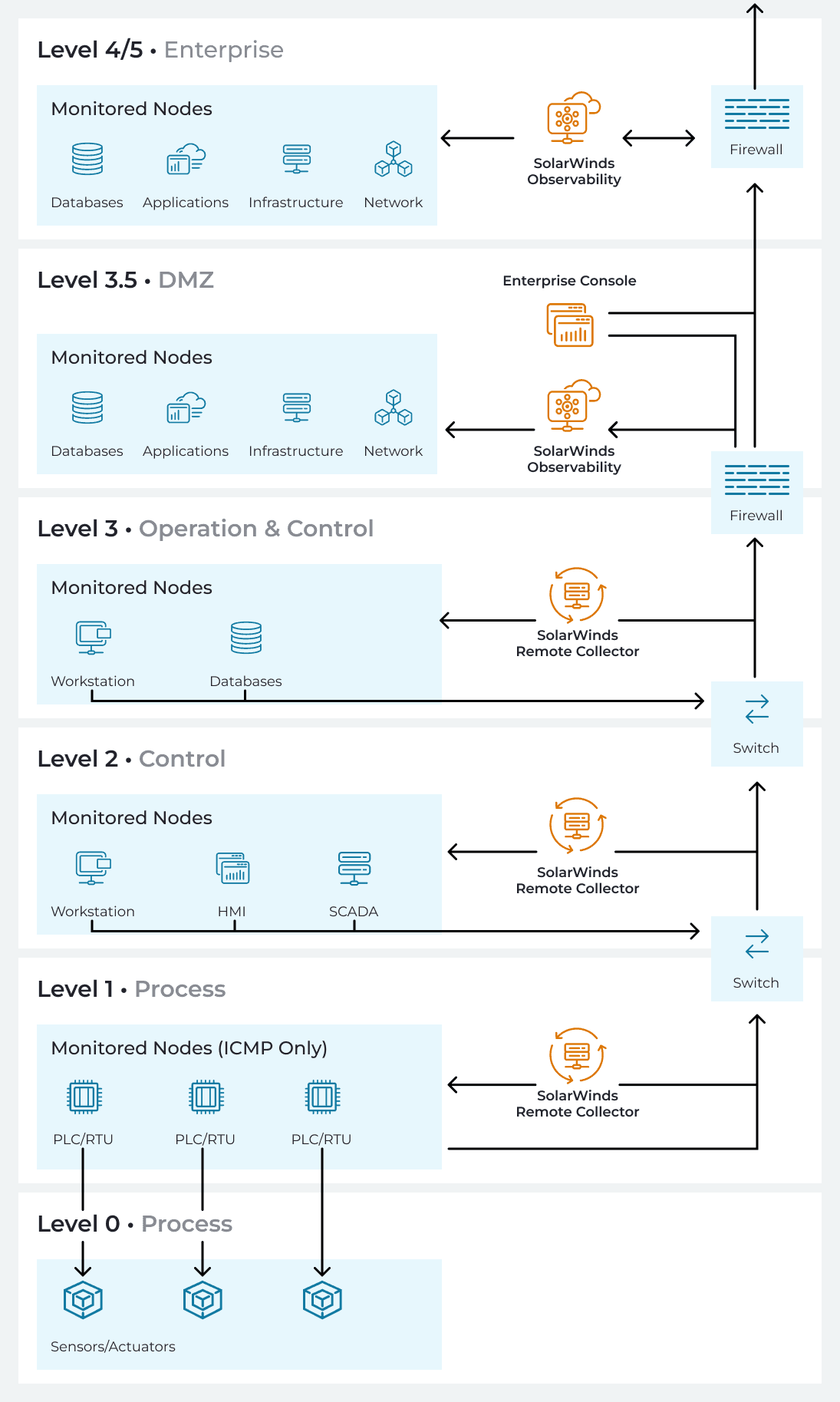
Levels 4/5: IT network monitoring instance
Your corporate IT network gets its own SolarWinds instance at the enterprise level. This can be self-hosted on-premise, Azure, or AWS, depending on your infrastructure strategy. It monitors:
Enterprise applications and servers
Corporate network infrastructure
Cloud workloads and SaaS integrations
End-user devices and services
This instance operates like a standard SolarWinds deployment, no special considerations needed beyond normal IT security practices.
Level 3.5: OT network monitoring instance
Your OT network gets its own independent SolarWinds instance, deployed on-premise within the secure OT perimeter in the demilitarised zone between IT and OT. This instance monitors manufacturing operations, SCADA systems, and anything that bridges IT and OT operations.
The separation isn't due to SolarWinds limitations, it's about operational independence. When your security team detects suspicious activity and needs to isolate the OT network, monitoring doesn't stop. Teams simply log into each instance directly:
IT teams monitor corporate systems via the IT instance
OT teams monitor industrial systems via the OT instance
No unified dashboard during isolation, but full visibility where it matters
The alternative (a single instance serving both environments) means choosing between security (keep networks isolated, lose monitoring) or visibility (maintain monitoring, compromise isolation). With two instances, you get both.
For Australian organisations, this architecture also satisfies SOCI compliance requirements, which mandate the ability to isolate critical infrastructure for up to three months. But the business case extends far beyond regulatory checkboxes.
Level 3.5: Enterprise console for end-to-end visibility
In the DMZ alongside the OT instance, you can deploy the Enterprise Operations Console. During normal operations, this console aggregates data from both your IT instance and your OT instance, providing end-to-end visibility across the entire organisation. Leadership and cross-functional teams get a single pane of glass without compromising the independence of either environment.
Critically, the Enterprise Console doesn't do the monitoring itself, it's a visualisation and aggregation layer. The actual monitoring happens in the independent instances. This gives you:
Executive dashboards showing IT and OT health side-by-side
Correlated alerting across environments
Unified reporting for compliance and operations
Single access point for cross-functional teams
When isolation is required, the console simply stops receiving data from the isolated OT instance. The OT instance keeps running, teams keep monitoring, they just access it directly rather than through the unified view.
Levels 0-3: Remote collectors in the OT zone
Within the OT network, you deploy remote collectors at Levels 1, 2, and 3. These lightweight agents sit within each security zone, collecting monitoring data locally and sending it upstream to the OT instance via encrypted, outbound-only connections.
Why remote collectors instead of direct polling?
Security: Remote collectors only communicate outbound. No inbound firewall rules required, no bidirectional access paths, no entry points for attackers. The monitoring data flows one way: up the Purdue stack.
Reliability: Each collector operates independently. If connectivity between zones breaks (during maintenance, network issues, or deliberate isolation), monitoring continues locally. Data queues locally for up to 24 hours and syncs when connectivity returns.
Segmentation alignment: Remote collectors respect Purdue boundaries. A collector in Level 1 monitors Level 1 devices. It doesn't reach across security zones or create cross-level access requirements.
Even in stable, well-connected environments, remote collectors reduce attack surface and simplify firewall management. The security benefit alone justifies deployment. They shine particularly in environments with:
Geographic distribution (mining sites, dam facilities, remote substations)
High security requirements (critical infrastructure, defence applications)
Unreliable connectivity (satellite links, cellular backhaul, intermittent networks)
Strict change control (environments where opening firewall ports requires extensive approval)
Level 0: Physical processes at this level (sensors, actuators, machinery) don't need direct SolarWinds monitoring. The devices at Level 1 (PLCs, RTUs) already monitor physical sensors and actuators. SolarWinds monitors those devices, giving you visibility into process health without directly touching the physical layer.
The Bottom Line
Don't try to deploy one monitoring instance that does everything. Deploy two independent instances that work together during business as usual, and continue working separately when OT isolation is required. That's how you get monitoring that delivers both security and visibility.
For a real-world example of this architecture in action, read our case study on maintaining continuous monitoring during SOCI compliance lockdowns. It details how we helped an Australian utilities provider implement this architecture to meet SOCI requirements while maintaining operational visibility across 30+ critical infrastructure sites.
For help aligning SolarWinds with Purdue architecture or SOCI requirements, get in touch and we'll walk you through the process.